How to Track Subscriptions?
It is a modern financial reality: the “subscription economy” makes life convenient, but it also creates a “silent drain” on your disposable income. What starts as a few dollars for a streaming service can quickly snowball into hundreds of dollars in recurring monthly expenses that fly under your radar.
If you want to take back control of your finances, here is a comprehensive guide to auditing your digital and physical subscriptions.
The Hidden Cost of “Subscription Creep”
“Subscription creep” happens when small, automated payments accumulate over time. Because these charges are often small $9.99 here, $14.99 there, they don’t trigger the same “spending pain” as a large one time purchase. However, many consumers are unknowingly paying for:
- Streaming Services: Overlapping platforms (Netflix, Disney+, Hulu, Binge) where you only watch one show.
- Premium Apps: Productivity tools, photo editors, or fitness trackers you downloaded for a “free trial” and forgot to cancel.
- Club Memberships: Gyms you no longer visit or retail memberships (like Amazon Prime or Costco) you don’t utilise fully.
- Cloud Storage: Paying for extra gigabytes across multiple providers like iCloud, Google One, or Dropbox.
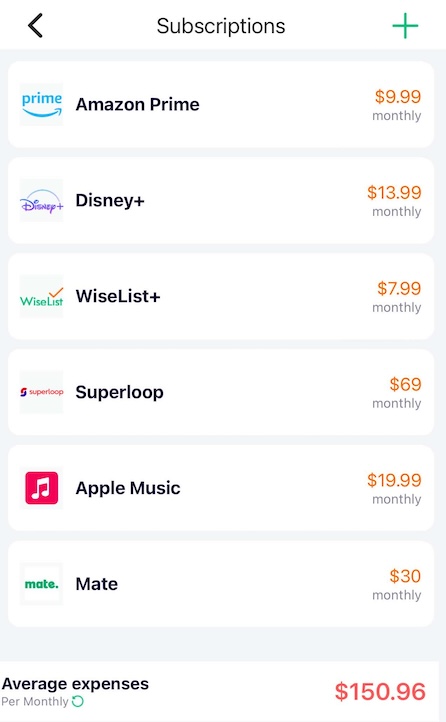
4 Steps to Optimise Your Monthly Cash Flow
Step 1: Conduct a Comprehensive Financial Audit
Don’t rely on your memory. Sit down with your bank statements and credit card history from the last 90 days. Look specifically for “recurring” tags.
Pro Tip: Check your Apple App Store and Google Play Store “Subscriptions” settings, as many mobile app charges don’t appear with clear names on bank statements.
Step 2: Ruthlessly Identify and Prune Unused Services
Be honest about your usage habits. If you haven’t opened an app in 30 days, it’s likely a candidate for cancellation.
- The “Rotate” Strategy: Instead of paying for five streaming services at once, subscribe to one, watch your favorite series, cancel it, and move to the next.
- Check for Redundancy: Are you paying for Spotify Premium and YouTube Premium? Choose the one that provides the most value.
Step 3: Map Out Your Renewal Dates
Surprise annual charges are the biggest budget-killers. Create a calendar or spreadsheet to track renewal dates and billing cycles.
- Annual vs. Monthly: Annual plans usually offer a discount (often 10%–20%), but they require a larger upfront cost. If you’re sure you’ll use the service, switch to annual. If not, stay monthly to keep your “exit strategy” flexible.
Step 4: Leverage a Subscription Tracker
Managing a dozen different login portals is exhausting. Using a dedicated bill management app or subscription tracker is the most efficient way to maintain oversight.
- Monitor Payments: Get a bird’s-eye view of your total monthly “burn rate.”
- Automated Reminders: Receive alerts before a free trial ends or a major annual fee hits.
- Centralised Control: Apps like WiseList help you organise bills, track spending patterns, and identify where you can save.
Tracking your subscriptions isn’t just about cutting costs; it’s about intentional spending. By eliminating digital clutter, you ensure your hard-earned money is only going toward services that actually improve your life. Taking thirty minutes today to audit your accounts could save you hundreds or even thousands over the next year.