What Is a To Do List?
A to do list is a simple system for organising tasks you need to complete today, tomorrow, or sometime in the future. Whether you’re managing work, family, or everyday life admin, a to do list helps reduce mental overload, improve focus, and ensure nothing important gets forgotten.
Life moves fast. Between work deadlines, school pick‑ups, bills, appointments, and household chores, it’s easy to feel overwhelmed. Trying to keep everything in your head leads to forgotten tasks, unnecessary stress, and constant mental fatigue. A to do list gives your brain a break by capturing everything in one trusted place.
Example of a Simple To Do List
A to do list doesn’t need to be complicated. Here’s what a basic one might look like:
- Pay electricity bill
- Buy groceries
- Call the plumber
- Submit work report
- Pick up kids from school
This list can live on paper, in your phone notes, or inside a digital to do list app that keeps everything organised and easy to manage.
Why Use a To Do List?
Using a to do list turns chaos into clarity. Instead of juggling tasks mentally, you can focus on completing one thing at a time.
A good to do list helps you:
- Reduce mental clutter by offloading tasks from your memory
- Stay focused on what actually matters today
- Prioritise urgent and important tasks
- Avoid forgetting deadlines and commitments
- Feel more in control of your time and energy
It’s not just about productivity — it’s about peace of mind.
Types of To Do Lists
There’s no single “right” way to organise tasks. Different situations call for different types of to do lists:
- Daily to do list – tasks you want to complete today
- Weekly to do list – a broader view of upcoming responsibilities
- Personal to do list – life admin, errands, and personal goals
- Work to do list – meetings, deadlines, and professional tasks
- Digital to do list – tasks managed in an app with reminders and syncing
Many people use a mix of these, depending on their lifestyle.
How to Create a To Do List That Actually Works
The Problem: Too Many Apps, Too Much to Remember
Most people start with good intentions. Notes app for ideas. Reminders app for deadlines. Another app for groceries. Instead of feeling organised, you end up switching between tools and trying to remember where you wrote what.
A to do list should simplify your life not add more friction.
That’s why an integrated digital to do list works best. When tasks, groceries, notes, and reminders live in one place, nothing slips through the cracks.
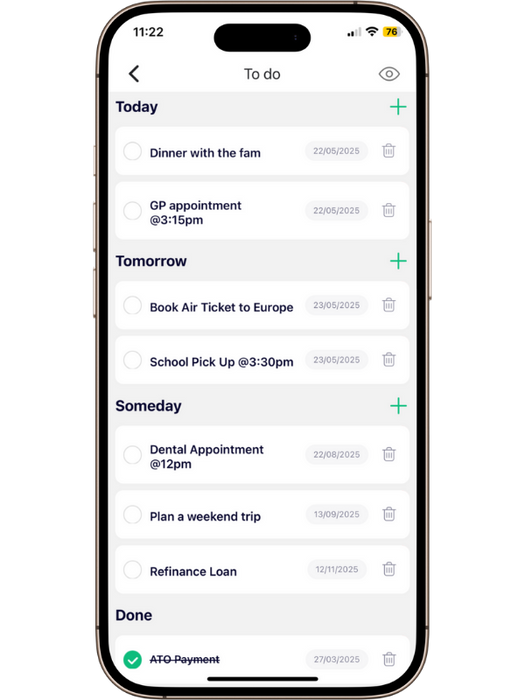
The App’s To Do List Feature Focus: Today, Tomorrow, Someday
The easiest way to create a to do list that actually works is to sort tasks by time:
| Category | Your Role | What Happens |
| ☀️ TODAY | Your essential, must-do tasks for immediate action. | This list is kept short for maximum daily focus. |
| 🗓️ TOMORROW | Tasks that are scheduled next, but not critical right now. | Safely stage your next day’s priorities for planning. |
| 🏔️ SOMEDAY | Goals, long-term projects, or ideas for the distant future. | Secure storage that keeps the clutter out of your daily view. |
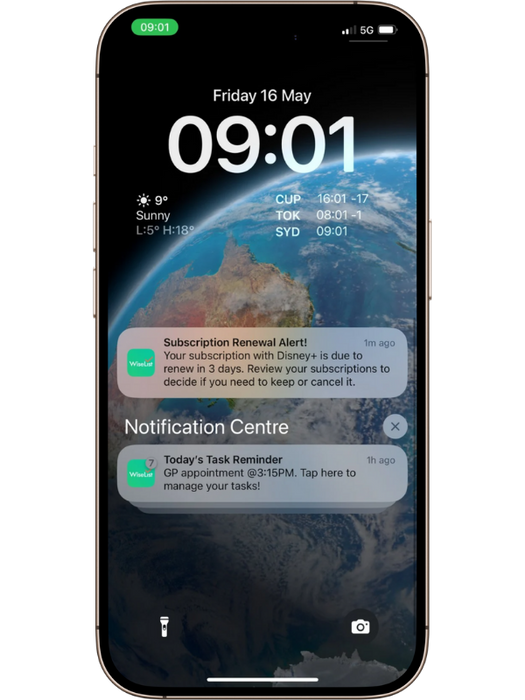
🔔 Integrated Smart Reminders: Never Miss a Deadline
WiseList turns your list into an active assistant. You will receive reminders exactly when you need them especially as a task’s due date gets closer guaranteeing timely action and helping you maintain control over your schedule.
Achieve More: Learn How to Use the To Do List Feature
Paper To Do List vs Digital To Do List App
Paper lists are simple, but they come with limitations.
- They get lost or forgotten
- They don’t send reminders
- You can’t easily reschedule or search tasks
A to do list app solves these problems by keeping everything accessible, organised, and synced across your devices.
Why Use a Digital To Do List App?
A smart online to do list does more than store tasks — it actively helps you stay on track.
With a digital to do list app, you can:
- Create and update tasks instantly
- Set due dates and times
- Receive reminders before deadlines
- Track personal, work, and family tasks in one place
- Stay organised across your phone and other devices
How WiseList Helps You Stay Organised
Many Australians already use WiseList to manage groceries, budgets, and household planning. The WiseList To Do List feature brings the same simplicity to your daily tasks — all inside one app.
One Hub for Everything
Manage chores, appointments, errands, work tasks, and reminders in one central place. Your to do list lives alongside your grocery lists, notes, and bills.
Effortless Task Entry
Capture tasks the moment they pop into your head. No friction, no forgotten ideas.
Smart Reminders
Set dates and times and get notified when it matters — whether it’s a GP appointment, school deadline, or bill payment.
The Satisfaction of “Done”
Ticking off completed tasks isn’t just satisfying — it keeps you motivated and focused throughout the day.
What You Gain With an Integrated To Do List
| Benefit | Why It Matters |
|---|---|
| Reduced mental load | Free your mind from remembering everything |
| Increased productivity | Focus on what matters most |
| Seamless organisation | Tasks, groceries, and life admin in one app |
| Less stress | Clear plans and timely reminders |
Practical Ways to Use Your To Do List Every Day
- Morning check‑in: Review today’s tasks and set priorities
- Capture on the go: Add tasks as soon as they come to mind
- Plan errands: Group tasks like shopping and pick‑ups together
- Weekend planning: Organise chores so you still have time to relax
Ready to Take Control of Your Day?
Stop relying on memory, scattered notes, and sticky reminders. A well‑organised to do list gives you clarity, confidence, and control over your time.
Start using the WiseList To Do List today and turn everyday chaos into calm, manageable action.
Frequently Asked Questions About To Do Lists
What is a to do list?
A to do list is a simple system for organising tasks you need to complete today, tomorrow, or in the future. It helps you capture everything in one place so you don’t rely on memory, reducing stress and mental overload.
Many people now use a digital to do list instead of paper so tasks can be updated, prioritised and reminded automatically.
👉 Learn more about how to create a to do list that actually works.
What is the best way to organise a to do list?
The most effective way to organise a to do list is by time and priority. A simple structure like:
- Today – tasks that must be done now
- Tomorrow – tasks coming up next
- Someday – long-term goals and ideas
This approach keeps your daily list focused while preventing future tasks from being forgotten.
WiseList uses this exact system to help users stay organised without feeling overwhelmed.
Is a digital to do list better than a paper list?
For most people, yes. A digital to do list offers advantages that paper lists can’t:
- Automatic reminders
- Easy editing and reordering
- Secure backup
- Access across devices
Paper lists are easy to lose and don’t adapt as your day changes. A to do list app gives you flexibility and reliability.
What should I look for in a to do list app?
A good to do list app should be:
- Easy to use every day
- Designed for real life, not just work projects
- Able to send reminders
- Integrated with other life admin tasks
Australians benefit most from apps that combine tasks with groceries, notes and household planning.
👉 Compare options in Best To Do List App in Australia.
Can a to do list help reduce stress?
Yes. Writing tasks down removes the need to constantly remember everything. This “mental offloading” helps reduce anxiety, improve focus and increase productivity.
A well-organised to do list gives you clarity and control over your day instead of feeling reactive.
Who should use a to do list?
A to do list is useful for:
- Busy parents
- Students
- Professionals
- Couples managing shared responsibilities
- Anyone overwhelmed by life admin
If you manage more than a few responsibilities, a digital to do list can dramatically simplify your life.