Hi! How Can We Help?
How to Use Specials?
Specials shows this week’s offers at Woolworths, Coles and ALDI for your state, and points out the ones you already buy. Here is where to find it and how to use it.
Where to find Specials
- Open the WiseList app and tap Grocery in the bottom navigation bar.
- Tap the Deals tab at the top. The screen is titled Specials.
- Choose Rare, Woolworths, Coles or ALDI.
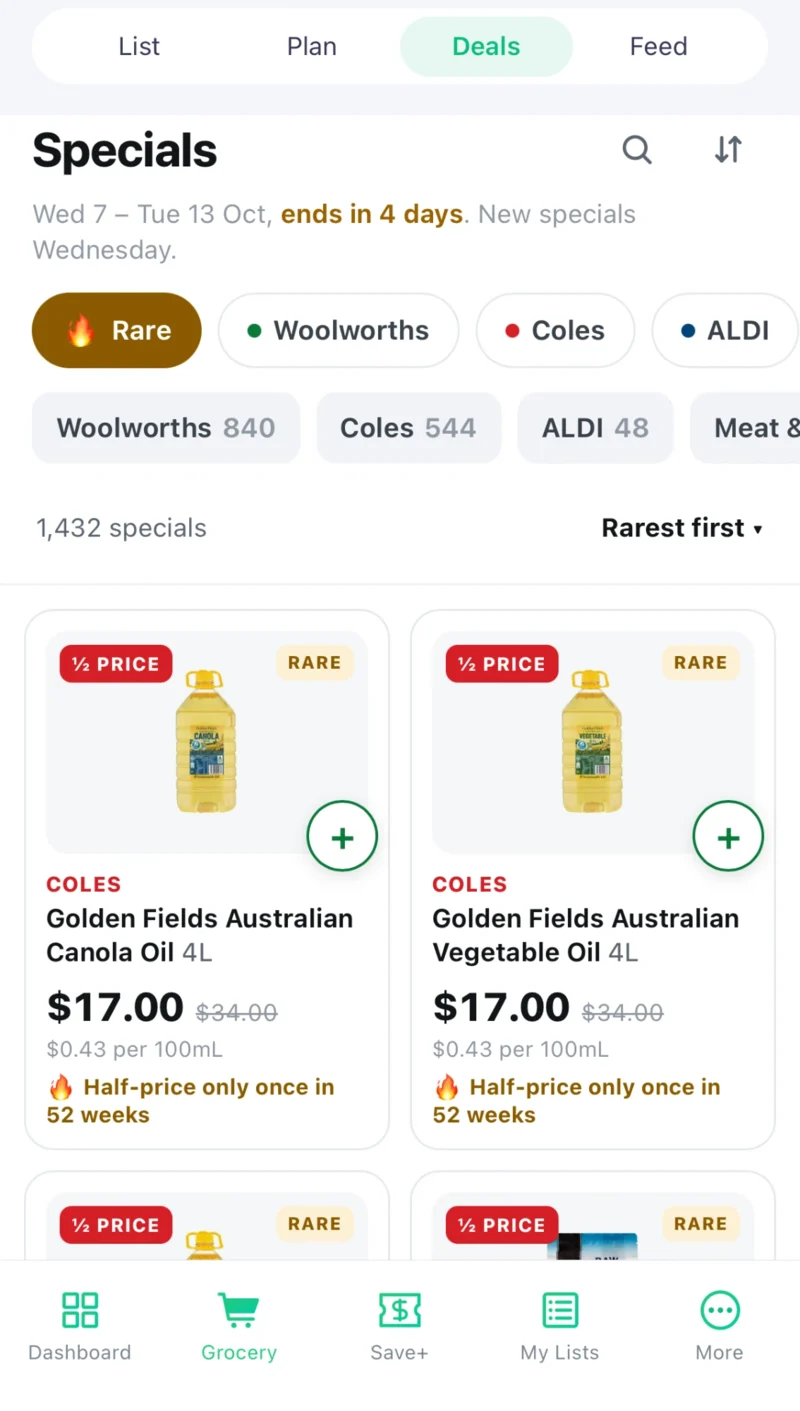
Find a special
- Tap a category under the store names, such as Half Price or a department, to narrow the list. Some categories have a second row of sub-categories.
- Use the search box to look for a product by name.
- Change the sort order, for example Groceries first, Biggest saving or Biggest % off. The Rare tab opens on Rarest first.
- Tap a special to see its details, including the offer week and, where WiseList can confirm a match, the price at another store.
Find rare specials
Tap Rare to see the specials that seldom come around, from all three stores, with the rarest first. Each one says why it is rare, for example “Half-price only once in 52 weeks”. You can narrow the Rare list to one store or one department.
Add specials to your grocery list
- To add one special, tap the plus button on it.
- To add several, pick each one, then tap Add to list when you are done.
- The specials you add appear on your grocery list in the app.
Make meals from specials
Pick the food specials you want to cook with, then choose to make meals. WiseList opens Meal Plan with those specials, ready to plan around.
Frequently asked questions
Where is Specials in the app?
Tap Grocery in the bottom navigation bar, then the Deals tab at the top. The screen that opens is titled Specials.
Is Specials free?
Yes. Specials is free for everyone. Free accounts can watch 5 products; WiseList+ makes the Watch List unlimited.
Why do I need to add my postcode?
Specials differ from state to state. WiseList uses the postcode on your profile to show the specials for your state. Add it in your profile in the app, then open Specials again.
When do the specials change?
New specials arrive each Wednesday. ALDI Special Buys go on sale on Wednesdays and Saturdays. If the page says the specials have ended, the new week has not arrived yet.
Why does an ALDI special have no “Was” price?
ALDI does not publish was-prices. Its specials are grouped by offer, such as Super Savers and Special Buys, and sorted in that order.
Why can’t I see ALDI?
ALDI specials are shown only in states where ALDI has stores. Woolworths and Coles specials are still shown.
What does the Rare tab show?
Specials that seldom come around, from all three stores, each with a line saying how rare it is, such as “Half-price only once in 52 weeks”.
Why does a product say “This week’s price, not a discount”?
Some products, mostly fruit and vegetables, are listed at their normal price for the week. WiseList shows the price and does not call it a special.