Instantly Create Any List with WiseList
Stop creating lists from scratch.
With Ask for a List, simply tell WiseList what you need and our AI will generate a complete, organised list in seconds.
Whether you’re planning a holiday, moving house, shopping for groceries or organising your week, WiseList helps you get started instantly.
Once your list is created, you can edit it, save it and even share it with your family, friends or household.
Create Lists for Almost Anything
Just type what you need.
For example:
- ✈️ Travel packing lists
- 🛒 Grocery shopping lists
- 🎉 Party planning checklists
- 🏕️ Camping essentials
- 🧹 Cleaning schedules
- 🏡 Moving house checklists
- 🎄 Christmas shopping lists
- 🎁 Gift lists
- 🐶 Pet supply lists
- 👶 Baby essentials
- 📚 School supply lists
- 🚗 Road trip checklists
- 🛠️ Home renovation lists
- 📦 Weekly household tasks
If you can think of it, WiseList can help create it.
How It Works?
Step 1: Open Ask for a list
Navigate to “My List “and Under “Life Admin” select Ask for a List.
Step 2: Tell WiseList What You Need
Simply type what you’d like to create.
Examples include:
- “Create a camping checklist.”
- “Make a packing list for a week in Bali.”
- “Create a weekly cleaning schedule.”
- “Give me a grocery list for taco night.”
- “Make a moving house checklist.”
The more detail you provide, the more personalised your list will be.
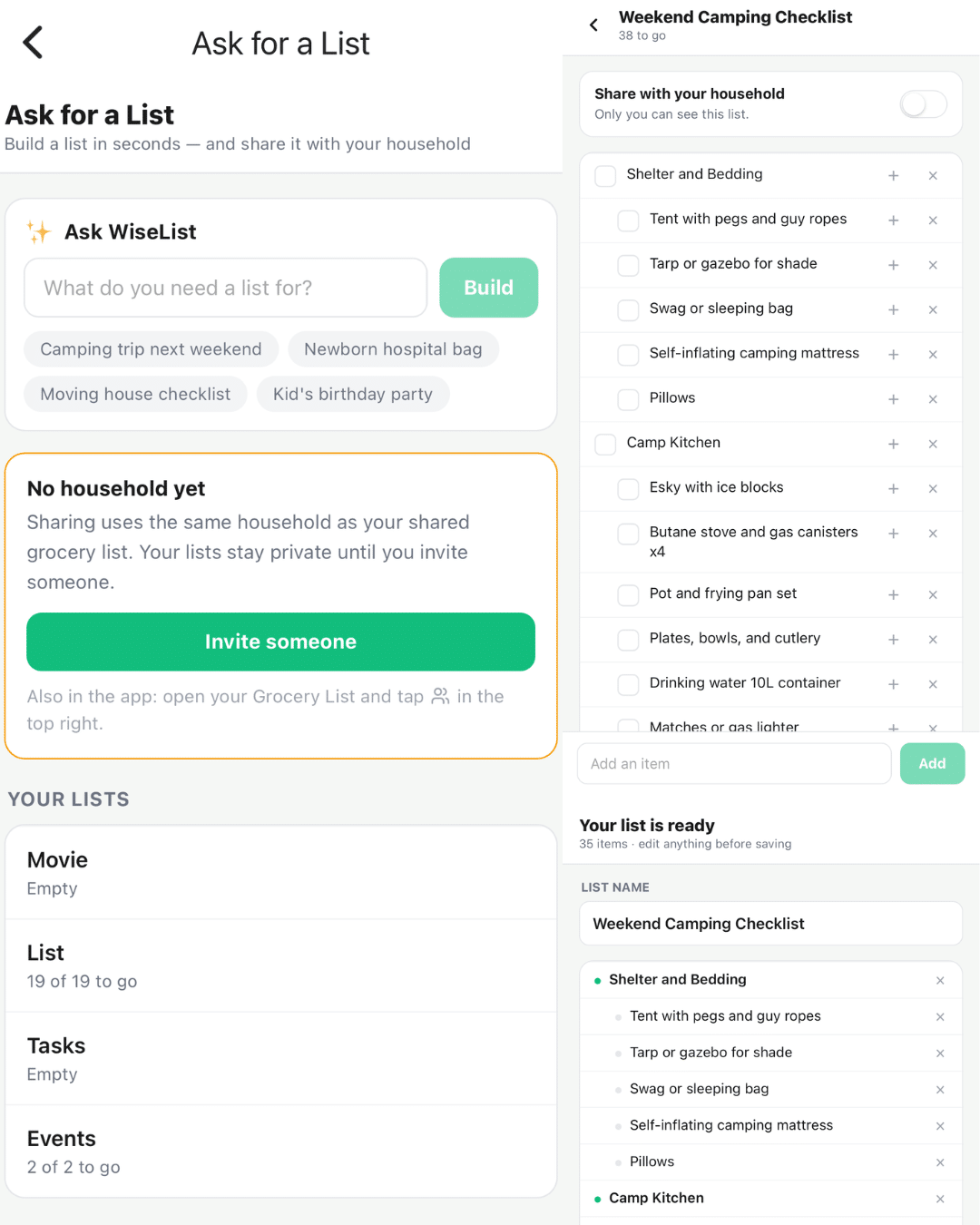
Step 3: WiseList AI Creates Your List
Within seconds, WiseList generates a structured checklist that’s ready to use.
You can:
- Add new items
- Remove items
- Edit existing items
- Tick items off as you go
Your list is completely customisable.
Step 4: Share with Others
Need someone else to help?
Simply generate a secure invite link and share your list with:
- Your partner
- Family members
- Housemates
- Friends
- Colleagues
Everyone can view and update the same list in real time.
Step 5: Stay Organised
Your saved lists are always available inside WiseList, making it easy to reuse, update or share them again whenever you need.
Perfect for Everyday Life
Ask for a List helps organise almost every part of your life.
Whether you’re planning a holiday, preparing for a new baby, hosting a birthday party or simply creating your weekly shopping list, WiseList saves you time by doing the hard work for you.
Instead of starting with a blank page, start with an AI-generated list that’s ready to personalise.
Why You’ll Love Ask for a List
✔ Create any list in seconds
✔ Save time with AI-generated checklists
✔ Edit every item to suit your needs
✔ Share lists with family and friends
✔ Collaborate in real time
✔ Keep all your lists organised in one app
✔ Reuse lists whenever you need them
Step 6: Manage Your Saved Lists
All of your AI-generated lists are saved in My Collections, which you can access from the My Lists tab.
From here you can:
- View your saved lists
- Open and edit existing lists
- Share lists with family or friends
- Reuse lists whenever you need them
Deleting a List
No longer need a list?
Simply go to My Collections under the My Lists tab, then tap and hold the list you’d like to remove.
A delete option will appear, allowing you to permanently remove the list from your account.