Save Recipes From Anywhere
Found a recipe on a website? Saw a recipe on Instagram? Took a screenshot of a recipe? Copied a recipe from a Facebook group?
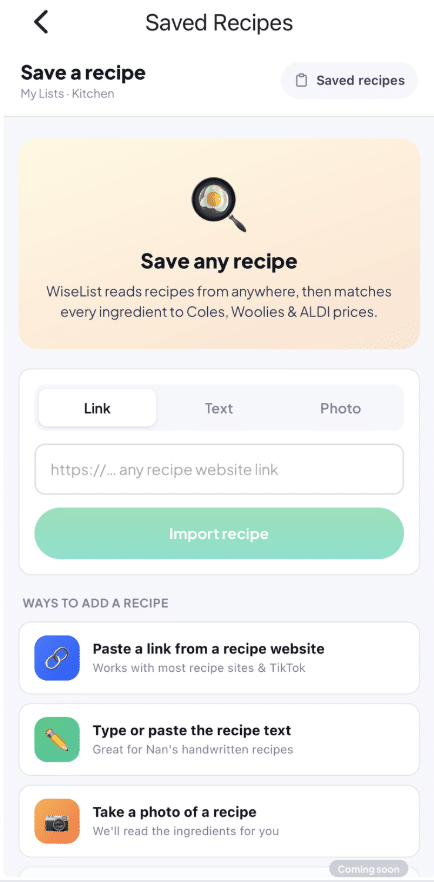
With WiseList, you can save recipes from almost anywhere and turn them into organised grocery lists in seconds. Instead of manually copying ingredients, WiseList helps automate the entire process so you can spend less time organising and more time cooking.
Three Easy Ways to Save Recipes
Save a Recipe Using a Website Link
Simply paste a recipe URL into WiseList.
WiseList automatically analyses the recipe and extracts the ingredients.
Perfect for:
- Recipe websites
- Food blogs
- Online cooking guides
Save a Recipe Using a Screenshot or Photo
Found a recipe on social media? Take a screenshot or upload a photo.
WiseList can identify the ingredients and organise them into a usable recipe.
Perfect for:
- Instagram recipes
- TikTok recipes
- Cookbook photos
- Handwritten recipes
Save a Recipe Using Text
Have recipe instructions copied into your notes?
Simply paste the text into WiseList.
The app will automatically identify ingredients and prepare them for your grocery list.
Turn Recipes Into Grocery Lists
One of the biggest frustrations when cooking is manually creating shopping lists. WiseList automatically converts recipe ingredients into an organised grocery list.
Benefits include:
- Faster shopping preparation
- Fewer forgotten ingredients
- Less manual work
- Better meal planning
Compare Recipe Costs Before You Shop
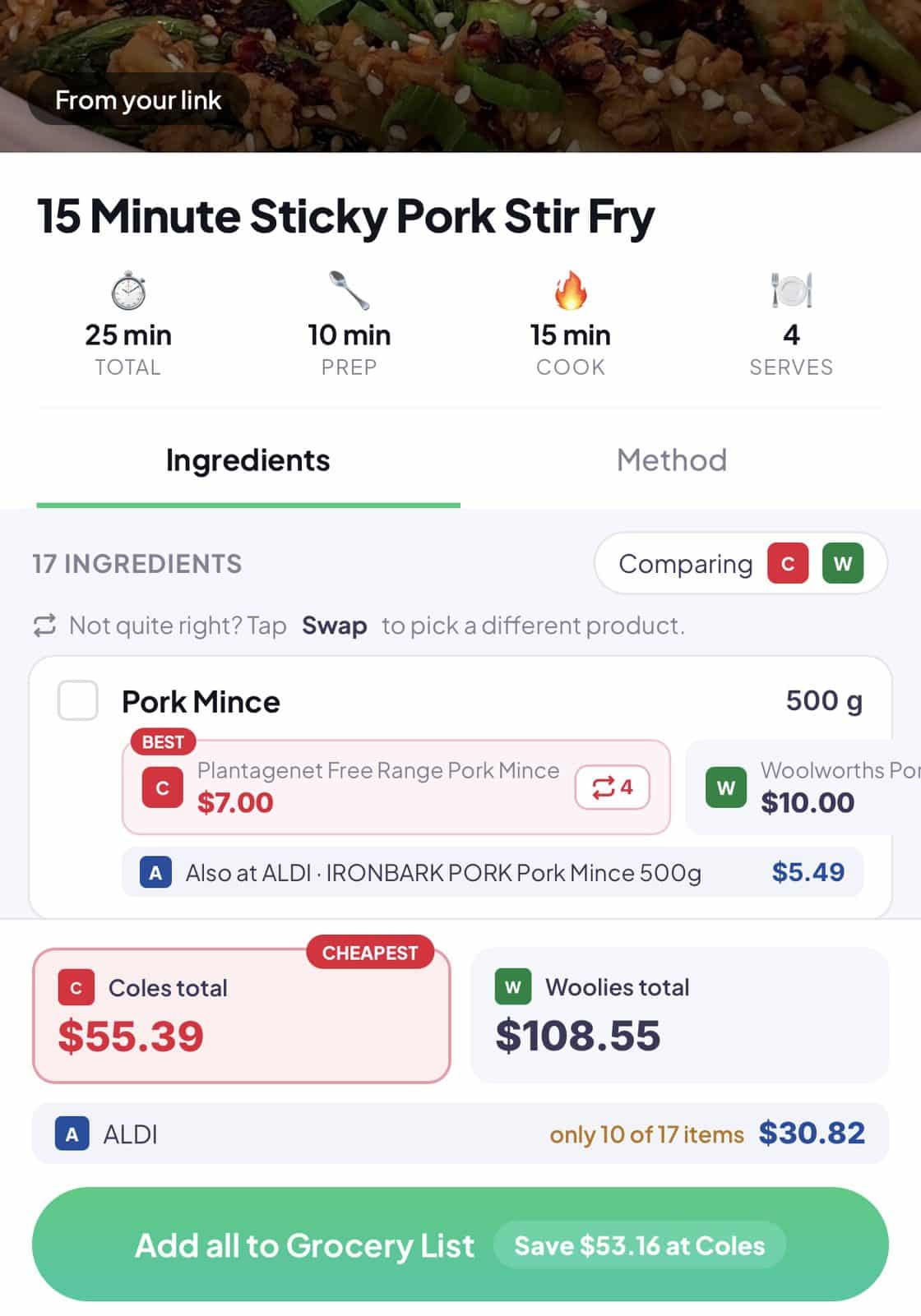
Unlike many recipe apps, WiseList helps you understand what a recipe may cost before you buy the ingredients. By comparing supermarket prices, you can make smarter shopping decisions and potentially reduce your grocery spend.
This is especially useful for:
- Families
- Budget conscious households
- Weekly meal planning
Check What You Already Have
Before purchasing ingredients, WiseList helps you review:
pantry list
fridge list
This reduces:
- Duplicate purchases
- Food waste
- Unnecessary spending
Build Your Personal Recipe Collection
Saving recipes isn’t just about creating grocery lists. Over time, WiseList helps you build a personal recipe collection that you can revisit whenever you need inspiration. Instead of searching through browser bookmarks, screenshots, social media saves and notes apps, all your favourite recipes can be stored in one place.
This makes it easier to:
- Find recipes quickly
- Reuse favourite meals
- Organise recipes by preference
- Build a collection of go to family meals
- Reduce time spent searching for recipes
Why Australians Use WiseList to Save Recipes
| Feature | Benefit |
| Save recipes via URL | Import recipes quickly |
| Upload screenshots | Save social media recipes |
| Paste recipe text | Flexible recipe importing |
| Grocery list creation | Shop faster |
| Pantry integration | Avoid duplicate purchases |
| Meal planning | Organise meals |
| Price comparison | Save money |
FAQ
Can I save recipes from websites?
Yes. Simply paste the recipe URL into WiseList.
Can I upload recipe screenshots?
Yes. WiseList supports recipe screenshots and images.
Can I paste recipe text?
Yes. Copy and paste recipe instructions directly into WiseList.
Can WiseList create a grocery list from a recipe?
Yes. Ingredients can be converted into grocery lists automatically.
Can I compare recipe ingredient prices?
Yes. WiseList can help compare ingredient costs across supported supermarkets.