How to Save Recipes From Instagram, TikTok, Facebook and Websites
Social media has completely changed the way we discover recipes. Instead of flipping through cookbooks or searching Google, millions of people now find dinner inspiration while scrolling through Instagram Reels, TikTok videos and Facebook posts.
One minute you’re watching funny videos. The next, you’ve found the perfect creamy pasta, crispy chicken recipe or healthy meal prep idea that you definitely want to cook later.
So you tap Save. A week later… You can’t find it. If this sounds familiar, you’re not alone.
Most people save recipes across multiple platforms, making them difficult to organise and even harder to find when it’s actually time to cook. The good news is there’s a much better way to manage your favourite recipes.
The Problem With Saving Recipes on Social Media
Every platform has its own way of saving content.
- Instagram has Saved Collections.
- TikTok has Favourites.
- Facebook has Saved Posts.
- Pinterest has Boards.
- YouTube has Playlists.
On their own, these features work reasonably well. The problem starts when you use all of them. Your recipes quickly become scattered across multiple apps.
Instead of having one organised recipe collection, you end up asking yourself:
- Was that pasta recipe on Instagram?
- Did I save that curry on TikTok?
- Was it Facebook or YouTube?
- Did I screenshot it instead?
Finding one recipe can become harder than actually cooking it.
Why Social Media Isn’t Designed to Organise Recipes
Social media platforms are built to keep you scrolling. They aren’t designed to become your personal cookbook.
Imagine you’ve saved:
- 150 Instagram recipes
- 80 TikTok recipes
- 40 Facebook recipes
How do you quickly find:
- Vegetarian dinners?
- Chicken recipes?
- Quick lunches?
- Dessert ideas?
- Air fryer recipes?
Most social platforms don’t let you organise recipes the way a dedicated recipe app can. Instead, you’re left endlessly scrolling through saved posts.
The Hidden Cost of Recipe Chaos
Losing recipes isn’t just frustrating. It can also cost you money and time.
For example: You remember seeing an amazing lasagne recipe a few weeks ago. You can’t find it. Instead, you search again. Thirty minutes later you’re still scrolling. Eventually you give up and order takeaway. Or perhaps you buy ingredients for a completely different recipe, forgetting you already had another meal planned.
Small moments like these happen more often than people realise. Having an organised recipe collection helps remove this unnecessary decision making.
A Better Way to Save Recipes
Instead of saving recipes inside social media apps, save them somewhere designed specifically for cooking. Using Save a Recipe feature on WiseList you can keep recipes from multiple sources together in one organised collection.
Whether the recipe comes from:
- TikTok
- YouTube
- Food blogs
- Recipe websites
Everything lives in one place. No more remembering which app it came from. No more endless scrolling.
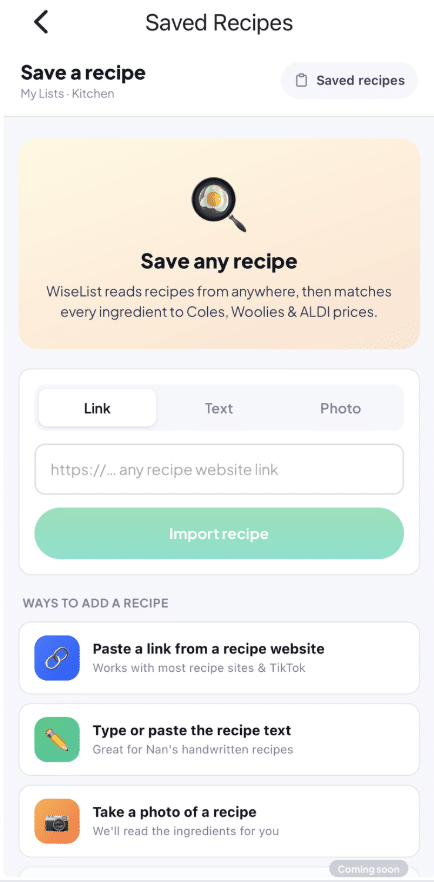
Have your Recipes on in one App
Once your recipes are stored in WiseList, they’re much easier to manage. Instead of searching through hundreds of saved social media posts, you’ll know exactly where to look.
Save Recipes Before They Disappear
One challenge with social media is that content isn’t always permanent.
Creators sometimes:
- Delete posts
- Remove videos
- Change accounts
- Make profiles private
If you’ve only saved the post inside Instagram or TikTok, you risk losing access altogether.
Saving recipes in Saved Recipes helps ensure they’re still available whenever you’re ready to cook.
Add Ingredients Straight to Your Shopping List
One of the biggest advantages of storing recipes in WiseList is that recipes don’t exist in isolation. Once you’ve chosen what you’d like to cook, you can create your Grocery List using the ingredients you need. This means fewer forgotten ingredients and fewer unnecessary supermarket trips.
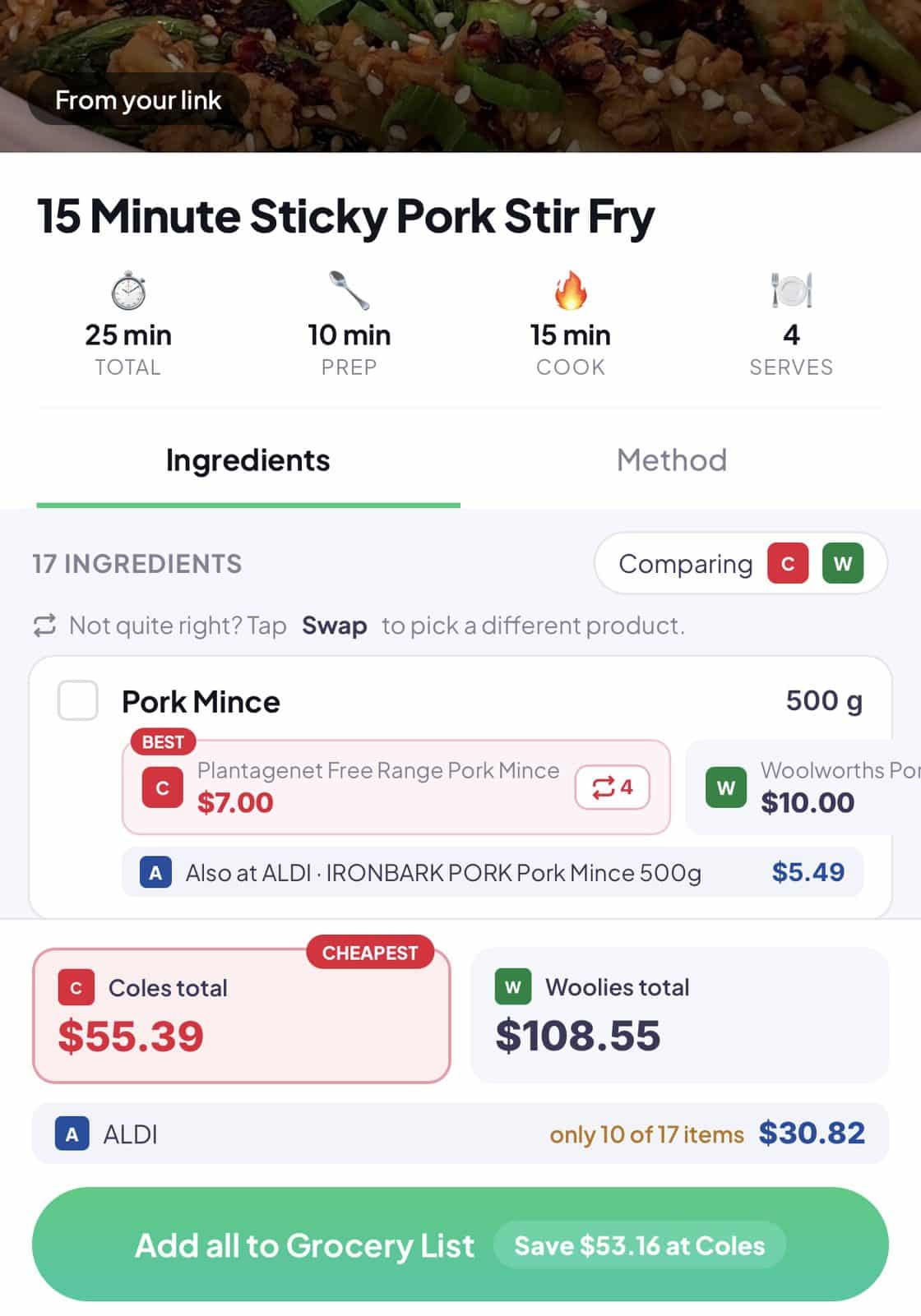
Compare Grocery Prices Before You Shop
Cooking at home already helps save money. You can stretch your grocery budget even further by using Grocery Comparison before heading to the supermarket. Compare prices across participating supermarkets to see where your ingredients are cheapest. Combined with organised recipes, this creates a smarter grocery workflow.
Use Ingredients You Already Have
Sometimes you don’t need a new recipe. You simply need a recipe that matches the ingredients already sitting in your kitchen.
That’s where Use It Up comes in -Using Ingredients That Are About to Expire
Instead of browsing endless recipes, Use It Up suggests meals based on ingredients stored in your Pantry List and Fridge List, helping you use food before it expires.
Together, Save a Recipe and the Use it Up feature help you balance inspiration with practicality.
Your Kitchen Becomes Easier to Manage
When your recipes, pantry, fridge and shopping lists all work together, everyday cooking becomes much simpler.
Instead of wondering:
“What should I cook tonight?”
You already have:
- Saved recipes.
- Ingredients organised.
- Meals planned.
- Shopping lists prepared.
Everything works together in one place.
Tips for Organising Recipes
If you’re starting a recipe collection, here are a few tips:
Save Recipes Immediately
If you think you’ll cook it one day, save it now.
It’s much easier than trying to find it again later.
Don’t Rely on Screenshots Alone
Screenshots quickly become lost among thousands of photos.
Instead, keep recipes in one organised location.
Review Saved Recipes Regularly
Every few weeks, browse your saved recipes and add upcoming meals to your Meal Planner.
This helps ensure great recipes actually get cooked.
Why WiseList Is Different
Many people already save recipes. The problem is they save them in too many places. WiseList brings everything together.
Instead of juggling:
- TikTok
- Browser bookmarks
- Screenshots
- Notes apps
You have one organised recipe collection connected to your shopping, meal planning and kitchen inventory.
Frequently Asked Questions
What’s the best way to save recipes from Instagram?
The easiest approach is to store recipes in a dedicated recipe organiser like Save a Recipe rather than relying on Instagram’s Saved feature alone.
Can I save TikTok recipes?
Yes. Recipes discovered on TikTok can be saved and organised alongside recipes from websites, Facebook and other sources.
Why shouldn’t I just use screenshots?
Screenshots become difficult to search and organise over time. A dedicated recipe organiser keeps everything together in one place.
Can I organise recipes into categories?
Yes. Organising recipes into categories such as breakfast, dinner or desserts makes them much easier to find later.
Can I turn saved recipes into a shopping list?
Yes. After choosing a recipe, you can create a Grocery List containing the ingredients you’ll need.
Can I compare supermarket prices?
Yes. WiseList’s Grocery Comparison feature helps you compare prices before shopping.
What if I already have ingredients at home?
Use Eat First to discover recipes based on ingredients already stored in your Pantry List and Fridge List.
Can I use saved recipes for meal planning?
Absolutely. Saved recipes work perfectly alongside the Meal Planner, making it easier to organise meals for the week ahead.
Stop Losing Great Recipes
Every day, thousands of amazing recipes are shared across Instagram, TikTok and Facebook. The challenge isn’t finding them. It’s finding them again when you’re actually ready to cook. Instead of scattering recipes across multiple apps, organise them in one place with Save a Recipe.
Then connect them with your Meal Planner, Grocery List, Grocery Comparison, Pantry List, Fridge List and Use it Up List to create a complete cooking experience.
Save once. Cook anytime. Waste less. Enjoy more.